
Business
Stock Split Could Cost Google Over $500 Million


In this Dec. 12, 2013 file photo, Google co-founder Sergey Brin arrives for the Breakthrough Prize in Life Sciences awards in Moffett Field, Calif. Google may have to pay more than half a billion dollars for an unorthodox stock split aimed at ensuring co-founders Brin and Larry Page retain control over the Internets most profitable company. (AP Photo/Ben Margot, File)
MICHAEL LIEDTKE, AP Technology Writer
SAN FRANCISCO (AP) — An unorthodox stock split designed to ensure Google CEO Larry Page and fellow co-founder Sergey Brin retain control of the Internet’s most profitable company could cost Google more than half a billion dollars.
Page, 42, and Brin, 41, have maintained control over Google since they started the company in a rented Silicon Valley garage in 1998. Their ideas and leadership have spawned one of the world’s best known and most powerful companies with a market value of $368 billion and a payroll of about 54,000 employees.
Yet many investors have become frustrated with Page’s unwavering belief that Google should be spending billions on far-flung projects ranging from driverless cars to diabetes-controlling contact lenses that may take years to pay off and have little to do with the company’s main business of search and digital advertising. The big spending is one reason Google’s stock price is 3 percent below where it stood at the end of 2013, while the Standard & Poor’s 500 index has climbed 12 percent.
To maintain the power to drive Google’s direction, Page and Brin initially accumulated virtually all of the company’s class “B” shares, which have 10 votes for each “A” share. The duo, though, worried that control would erode as Google issued more “A” shares to pay for acquisitions and reward other workers. A year ago Thursday, Google split its stock to create a new category of “C” stock with no voting power that would allow more Google shares to be issued without undercutting Page and Brin.
Class “A” shareholders were outraged, skewering the maneuver as a textbook example of shoddy corporate governance. Google argued there wouldn’t be much difference between the price of “C” and “A” shares because Page and Brin held majority control anyway with the “B” shares. To settle a class-action lawsuit challenging the split, Google agreed to compensate “C” shareholders if the average price of “C” stock fell more than 1 percent below “A” shares through the first year of trading.
Google’s theory proved wrong, said BGC Financial Partners Colin Gillis. The difference turned out to be between 1 percent and 2 percent through the first year, though the final gap won’t be announced for up to 30 days as Google works with outside experts to determine the figures under a complex formula.
“This shows the market does place a value on owning a voting stock,” he said.
Google disclosed in a recent regulatory filing that it would have owed about $593 million to class C stockholders had the calculations been done on Dec. 31. Based on that estimate, the class C stockholders would receive roughly $1.74 per share in cash or additional stock. The exact amount that Google owes will be calculated based on the average trading prices over the full one-year period that ended Thursday after the stock market closed.
The Mountain View, California, company has until early July to pay the money. It’s something that Google can easily afford, given the company holds $64 billion in cash. And the damage could have been a lot worse: Google would have had to pay $7.5 billion, or about $22 per share, had the first-year spread between “A” and “C” shares was 5 percent or more.
Class C shareholders should ask themselves if the money they are getting is enough to compensate for relinquishing their voting rights and ceding control to Page and Brin, said Charles Elson, director of the University of Delaware’s Weinberg center for corporate governance.
Shareholders “are getting this cash for giving up their say in effective management,” Elson said. “This could be a case of ‘penny wise, pound foolish.'”
Google declined to comment.
Copyright 2015 The Associated Press. All rights reserved. This material may not be published, broadcast, rewritten or redistributed.








Black History
Five Hospitals Said No! Who Will Help Annette Henry Recover?
Annette Henry, a 67-year-old Oakland woman, is struggling to access essential medical care after a devastating stroke left her with a rare neuropathic pain syndrome. Despite medical documentation confirming her need for inpatient rehabilitation, five different Bay Area hospitals have denied her admission, often citing her inability to meet rigid therapy thresholds. Her family’s efforts to seek intervention from state and federal lawmakers have yielded no results, leaving Henry at home without a clear path to recovery. To see how these systemic failures are impacting her health, read more.


A tangle of red tape and contradictions between health providers and Medicare rules have impeded an Oakland woman’s ability to recover from a stroke she had last year.
Her family – who are her caretakers – have reached out to various professionals and state and federal lawmakers for help to no avail.
At 67, Annette Henry needs inpatient stroke rehabilitation after a devastating stroke in May 2025. Since then, multiple Bay Area hospitals have denied it. She was accepted into a rehabilitation facility in June 2025 but discharged prematurely in July, in essentially the same condition.
Three hospitals where she was a patient pushed skilled nursing over inpatient rehabilitation. Two more declined referrals.
Now at home, Henry is caught in a system that measures her need for treatment against the limitations treatment should address.
Medical professionals have documented her need for a higher level of care.
In August 2025, a Medicare Quality Improvement Organization (QIO) overturned Henry’s discharge from an inpatient rehabilitation facility (IRF).

The QIO’s independent physician reviewer found she had not received the “intensive therapy program outlined on admission,” according to the Aug. 30, 2025, determination letter. Yet the decision did not secure her readmission or guarantee continued rehabilitation.
Henry has central post-stroke pain, a rare neuropathic pain syndrome that can make movement and touch intensely painful. Her pain specialist recommended inpatient rehabilitation alongside pain management.
Nevertheless, facilities have cited her inability to tolerate three hours of daily therapy as a reason to deny inpatient rehabilitation.
That practice raises questions about Medicare coverage policy. In Hooper v. Sullivan, No. H-80-99 (D. Conn. 1989), the court recorded the parties’ agreement that denials based on numerical utilization screens, diagnostic screens, treatment norms, the “three-hour rule,” or other “rules of thumb” were not appropriate.
CMS subsequently cited Hooper in its Aug. 7, 2009, final rule (74 Fed. Reg. 39762, 39794). The policy is also addressed in the Medicare Benefit Policy Manual, Chapter 1, Section 110, and CMS’s June 1 Review Choice Demonstration for IRF Services: Operational Guide.
These authorities underscore the need for individualized assessments rather than rigid numerical thresholds.
The central contradiction is stark: the pain and disability that make rehabilitation necessary have been cited as reasons to deny it. UCSF Stanyan’s April 7 discharge summary for Henry states that acute rehabilitation unit (ARU) placement was declined for “inability to tolerate three hours of therapy daily.” Without appropriate treatment, Henry risks further decline.
Her records document complications associated with prolonged immobility.
Orthopedics documented flexion contractures of the small and ring fingers on March 19.
Chest imaging on April 1 showed bibasilar dependent atelectasis, a condition involving reduced inflation of the lower portions of both lungs. These concerns can be examined through her medical records and photographs.
“What does a ‘not reasonable’ discharge look like?” her family asks. For them, it looks like an appeal decision recognizing a problem without ensuring a remedy: repeated referrals, denials and a patient still without the rehabilitation her treating professionals have recommended.
The family has sought help from the California Department of Public Health and the federal Office for Civil Rights to no avail. They contacted U.S. Rep. Lateefah Simon in June 2025, while Henry was in rehabilitation; Senator Alex Padilla in May 2026; and Senator Adam Schiff in September 2026.
DeCuir says the family received no meaningful assistance and was redirected to the QIO or advised working with a social worker after Henry had already been discharged.
The consequences extend beyond rehabilitation. The family reports that Henry has struggled to attend in-person specialist or any appointments and needs in-person evaluation and treatment for complications, recommended evaluations, health screenings and preventive care.
Her mobility limitations have become barriers to broader medical care. Every office tells her their office is not set up to accommodate her. This has happened with specialty care, out-patient services, screenings and physical therapy.
Henry is a Black woman on Medicare, and her family believes her experience raises concerns about unequal access to intensive rehabilitation. Research has documented disparities in discharge to inpatient rehabilitation rather than skilled nursing, underscoring the importance of individualized review.
CMS, state regulators and healthcare providers should examine Henry’s records, assess her needs on their clinical merits and explain how the applicable coverage standards were applied, and whether they are being enforced.
Rehabilitation is not a reward for patients who can already tolerate treatment. It is care intended to help people recover function. Henry’s case asks whether a system designed to support recovery can leave a patient without a path to it.

Black History
From Backyard Grilling to Jack London Square: Jamale Carlyle’s Chicken Wing Success Story
Jamale Carlyle turned a backyard hobby into a flourishing business after using grilling to cope with the loss of his mother and sister. The former corporate executive and CPA transitioned from a twenty-year career in the power industry to selling chicken wings at farmers’ markets in Tracy and Oakland. Following immediate success and viral social media attention, Carlyle opened two permanent storefronts and established a charitable partnership to support local youth. His journey highlights a unique path from internal auditing to community entrepreneurship. Read more.
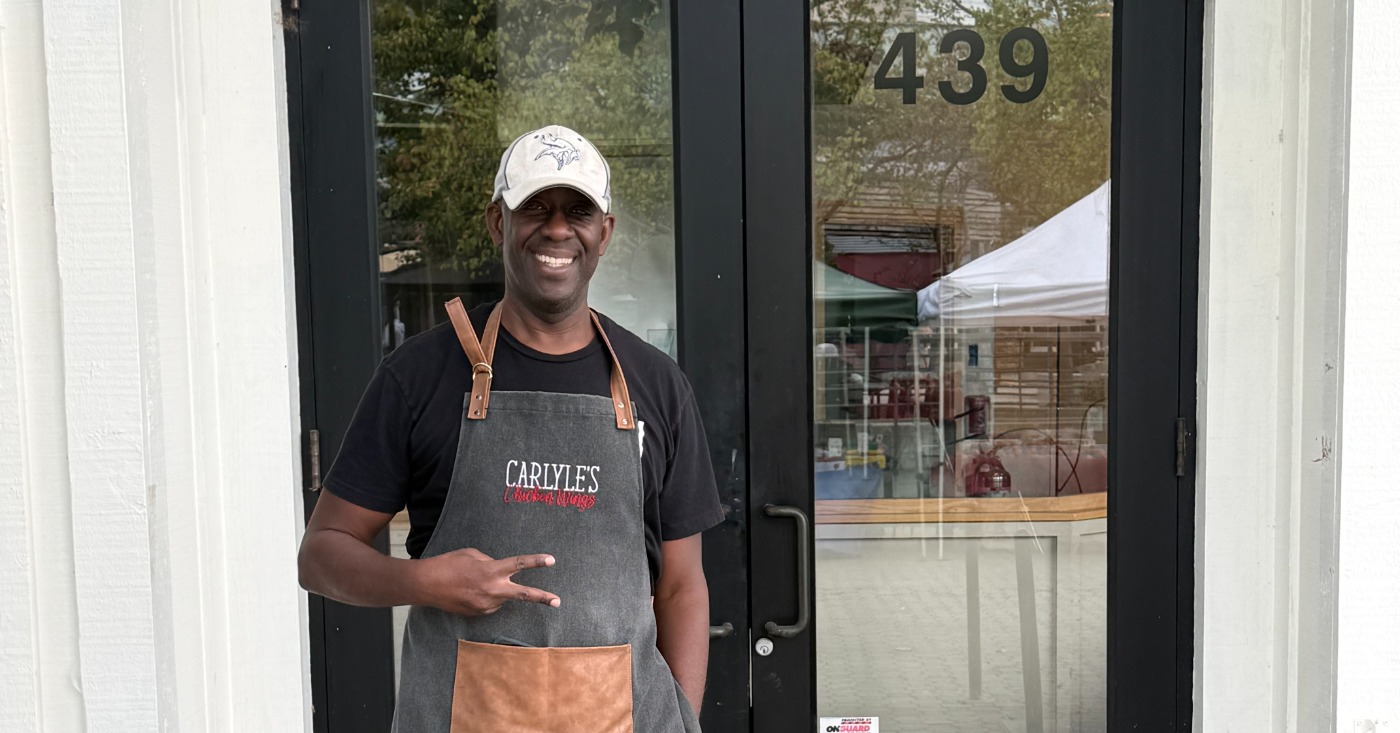
For Jamale Carlyle, what began as a way to cope with personal loss has grown into a thriving chicken wing business with locations in Tracy and Oakland’s Jack London Square.
Raised in Los Angeles, Carlyle remains a southern kid at heart, guided by the values and principles instilled in him growing up. In 2020, he lost his sister, and two months later, his mother passed away. The losses left him grieving half of his immediate family and searching for a way forward.
He turned to God, and to two favorite pastimes: grilling chicken wings and deep sea fishing. Friends who gathered in his backyard encouraged him to turn his chicken wings into a business.
Carlyle had built a successful corporate career before becoming an entrepreneur. An economics graduate of the University of California, Irvine, he earned a master’s degree in accounting from the University of Southern California and became a certified public accountant (CPA).
He spent more than 20 years in the power industry, including working for Edison International in Los Angeles and Boston. He later joined JP Energy Partners in Dallas, helping its team take the company public.
After moving to San Francisco in 2016, Carlyle spent 10 years with Pattern Energy, a wind energy company, where he served as vice president of Internal Audit and took on numerous corporate responsibilities.
But in 2025, grilling became more than a hobby. Carlyle began selling his wings at farmers’ markets, initially dedicating four hours every Saturday. Nervous about his first outing in Tracy, he wondered whether his friends had simply been encouraging. Instead, he sold out on opening day.
He later brought his business to Jack London Square’s Farmers Market, where he again sold out on his first day. As demand grew, he expanded into catering before opening his Tracy storefront in May 2026 and his Jack London Square location in July.
Social media helped fuel the momentum. In Tracy, enthusiastic reviews on the community’s Rants and Raves Facebook page brought customers through the door. His Jack London Square debut also gained traction online, generating approximately 100,000 views on social media on his on opening day.
Still processing the rapid growth, Carlyle describes the business as something that began in his backyard as a stress reliever and became an unexpected calling, and a way of giving back.
“Giving back” has led to a partnership with Mike Jenkins, owner of Oakland Strong, a nonprofit gym known for Olympic style weight lifting and developing national and international champions. After Jenkins visited Carlyle’s store with members of his team, Carlyle returned the visit, and the two began discussing ways to partner to support the community.
“I’m really big on charity. I believe in giving back to the community,” Carlyle said. “I knew before I opened my store, I’d be doing something like this, this is what God wants me to do.”
Their collaboration will introduce the “Oakland Strong Bowl,” featuring 10 dry-rub Cajun wings and a vegetable-rice bowl for $17.99, with $2 from each purchase donated to the Oakland Strong Foundation. The initiative is expected to launch in early November.
“This builds community in Oakland and Jack London Square,” Carlyle said.
Looking ahead, Carlyle plans to expand the menu with chicken thighs, chicken tacos and additional sides. He is also pursuing a liquor license to create a destination where customers can enjoy wings while watching sports.
For now, he is focused on growing his two locations. But with customers embracing his food and his commitment to giving back, Carlyle sees the possibility of bringing his chicken wings to more communities throughout the Bay Area.
Business
SEIU Local 1000 and State of California Will Continue to Negotiate New Labor Contract
Thousands of California state employees represented by SEIU Local 1000 recently staged a one-day walkout to protest stalled contract negotiations with Governor Gavin Newsom’s administration. The union, which represents approximately 100,000 public workers, is demanding a 20% wage increase over three years and an end to mandatory four-day in-person work requirements. While the initial strike has concluded, union leadership warns that further demonstrations are likely if the state continues to reject their demands for better pay and telework flexibility. Negotiations are expected to continue as both sides seek a resolution. Read more.
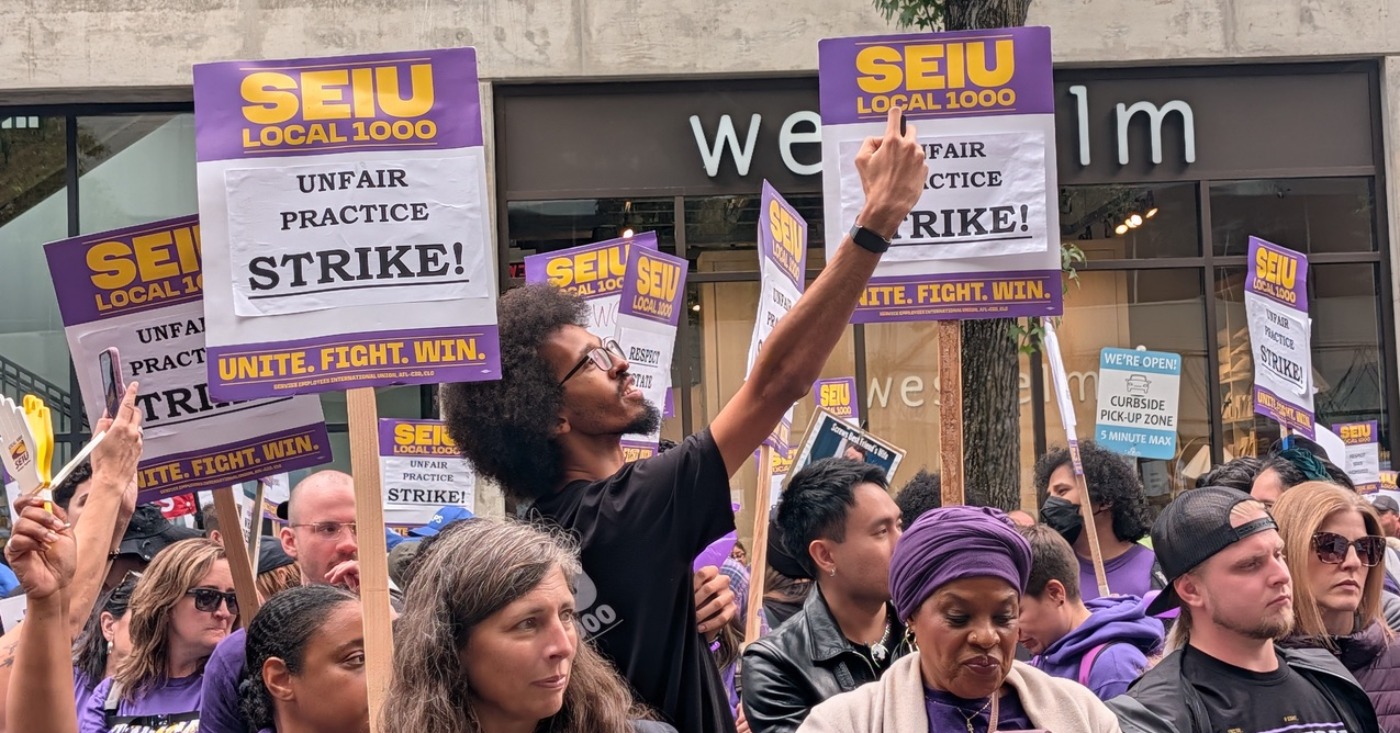
After the Service Employees International Union (SEIU) Local 1000 labor contract expired June 30 and talks with Gov. Gavin Newsom’s administration stalled, the union stepped up its efforts to secure a new agreement, saying its demands had gone unheeded.
On Oct. 21, thousands of state employees represented by SEIU Local 1000 staged a one-day walkout to protest alleged unfair labor practices during negotiations with Gov. Gavin Newsom’s administration.
Although the strike has ended, SEIU Local 1000 President Anica Walls said further demonstrations or an expanded strike are highly likely if contract negotiations remain stalled. The union represents approximately 100,000 public employees statewide.
“We are out here because our jobs matter,” Wells said. “If they continue to refuse to bargain with us in good faith, we are prepared to escalate.”
Sen. Lola Smallwood-Cuevas (D-Los Angeles) expressed support for SEIU Local 1000’s labor action in an Instagram post, emphasizing the importance of fair treatment for workers.
“I stand in complete solidarity with SEIU Local 1000,” Smallwood-Cuevas stated. “More than 100,000 state workers they represent are on strike today fighting for good-faith bargaining, fair treatment, and a contract that reflects the value of the essential public services they provide every day—all things that should be a given for the workers our state relies on the most.”
Smallwood-Cuevas, a member of the California Legislative Black Caucus (CLBC) added, “When California’s workers hold the line, the whole nation pays attention.”
According to union representatives, SEIU Local 1000 is seeking a contract that addresses rising living costs and provides greater workplace flexibility. The union is demanding a 20% wage increase over three years and an end to Gov. Gavin Newsom’s requirement that state employees work in person four days a week.
The union is also seeking increased state contributions toward employee health care benefits to reduce workers’ out-of-pocket costs.
On Sept. 18, Newsom vetoed Assembly Bill 1729, authored by Assemblymember Alex Lee (D-San Jose), which sought to expand telework opportunities for state employees.
The bill would have required state agencies to offer telework options or provide written justifications for requiring employees to work in person. Supporters argued that telework could save taxpayers approximately $225 million annually by reducing office space and parking costs while lowering vehicle emissions and improving employee retention.
Newsom said the legislation would limit state departments’ flexibility to manage their workforces and evaluate telework exemptions individually. He has also emphasized the benefits of in-person collaboration.
“I want people to come back to work, reengage, rediscover, collaborate, coordinate, develop relationships, friendships, and fall in love,” Newsom said in July. “You get three-day weekends. Four years ago, that would’ve been a triumph. Now it’s a burden.”
Union organizers described the Oct. 21 walkout as a one-day unfair labor practice strike, rather than an indefinite work stoppage. The action was intended to demonstrate solidarity and increase pressure on the state during negotiations.
SEIU Local 1000 has been without a contract since its previous three-year agreement expired June 30. Negotiations are expected to resume.
Responding to the statewide walkout, the California Department of Human Resources (CalHR) said it “remains focused on achieving a fair and responsible agreement with SEIU Local 1000 and continues to be available at the bargaining table.”



HISTORY MADE: Keisha Lance Bottoms Becomes First Black Woman Elected Governor in American History

HISTORY MADE: Keisha Lance Bottoms Becomes First Black Woman Elected Governor in American History

Five Hospitals Said No! Who Will Help Annette Henry Recover?

Oakland NAACP, BWOPA Speak Out Against Alleged Harassment of Black Women Political Leaders

COMMENTARY: Oakland’s Black Students Have Gained Ground: We Shouldn’t Stop Now

From Backyard Grilling to Jack London Square: Jamale Carlyle’s Chicken Wing Success Story

SEIU Local 1000 and State of California Will Continue to Negotiate New Labor Contract

OPINION: We Can Restore Checks and Balances on Trump

AG Bonta Announces Action on Cryptocurrency, Sextortion Fraud – Increasingly Targeting Gen-Z

21st Annual Taste of Soul: California’s Largest Black Street Festival Comes Alive With Culture, Music and Connections

Michael Shiner: The Enslaved Man Who Wrote His Way into American History

COMMENTARY: Your California Living Trust Could Be Next: When Evidence Isn’t Enough

Loop Capital’s James Reynolds Keynotes the OAACC 23rd Annual Business Awards Luncheon

Post News Group Nov. 3 Election Endorsements

Oakland Latino Chamber of Commerce Hosts CHCC Convention, Generating $3 Million in Economic Impact

COMMENTARY: Valarie Bachelor and Jennifer Brouhard are Excellent School Board Members and Deserve to Be Reelected

Listening as a Lifeline: A Doula’s Witness to Black Maternal Health

Doulas Are Helping Black California Moms Navigate Pregnancy–Even as High Mortality Rates Persist

Poll: Becerra Widens His Lead Over Hilton; Californians Split on Wealth Tax

Zakiya Jendayi Arrested, Locked Out of Home by Sheriff’s Deputies

County Office of Education Says OUSD Finances Are Getting Healthier, Materially Stronger

Oakland People’s Arms Embargo Coalition Demands End to Military Shipments Thru Oakland

BLACspace Cooperative Invites Bay Area to Experience Oakland’s Black Cultural Ecosystem Through a BLAC Map Tour + Party

From Historic Memories to New Possibilities: Oakland Celebrates Coliseum 60

BOOK REVIEW: ‘Laws of Solomon’ Reveals Tender Heart of Former Child Soldier
HISTORY MADE: Keisha Lance Bottoms Becomes First Black Woman Elected Governor in American History

On Your November Ballot: Prop 38 Would Allocate $8.4 Billion to Immunology and Immunotherapy Funding

It’s Time to Lose Weight Before the Holidays

Oakland Post: Week of September 23 – 29, 2026

Mayor Barbara Lee Holds Special State of the City Address in Deep East Oakland

The Conversation With Al McFarlane 6/23/26

Media Monday 6/22/26

LIVE! ASK ALMA! — TUES. 6.23.26 7PM EST

Car Buying Secrets: 4 Hidden Checks Before You Sign!

Is This 550 HP Charger Worth YOUR Money? AutoNetwork Review

Celebrating Juneteenth – Frederick Douglass on education and resistance

LIVE! — ASK ALMA! — TUES. 6.19.26 7PM EST

Hyundai Ioniq 5 Parking, Safety, and 360 View #shorts

2025 Ioniq 5 New Wiper & Powerful Performance! #shorts

Electric SUV Range: Is 259 Miles Enough? #shorts

EV Charging: How Fast Can You Charge an Electric Vehicle? #shorts

Biometric Cooling… Messaging Seats…Come on! 2025 Infiniti QX80 Autograph 4WD

Charged Up: Witness the Magic of a Fully Electric Car! #shorts

Range Rover Sport PHEV Included…: See What’s Inside This Luxury SUV! #shorts

Invisible Hood View: Perfect Parking with X-Ray Vision! #shorts
-
 Commentary3 days ago
COMMENTARY: Valarie Bachelor and Jennifer Brouhard are Excellent School Board Members and Deserve to Be Reelected
-
 Black History1 day ago
HISTORY MADE: Keisha Lance Bottoms Becomes First Black Woman Elected Governor in American History
-
 Community3 weeks ago
It’s Time to Lose Weight Before the Holidays
-
 Community3 weeks ago
Mayor Barbara Lee Holds Special State of the City Address in Deep East Oakland
-

 Community3 weeks ago
Democrats, Community Groups Back Measure EE to Change How Oakland Is Governed
-

 Featured3 weeks ago
Oakland Awarded More than $14 Million in State Funding
-

 Community3 weeks ago
‘ICE-Free Marin’ Supporters Press Supervisors as County Drafts Enforcement Restrictions
-

 Education3 days ago
OUSD Receives State Review of District Finances; Outlines Progress Since January
